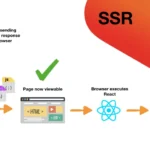
What Is Server-Side Routing in Angular?
By default, Angular is a Single Page Application (SPA). This means all routing is handled on the client-side using the Angular Router, not the server. When a user clicks a link, the browser doesn’t reload the page — Angular updates the view internally.
However, when implementing server-side rendering (SSR) using Angular Universal, the server must also support routing so that direct URL requests (like /about, /products/12) return the correct pre-rendered page.
This concept is known as server-side routing for Angular SSR.
Why Server-Side Routing Is Needed in Angular?
SPAs normally rely on index.html for all routes. But with SSR:
- The server must recognize Angular routes
- The server must render the corresponding HTML page
- The server must send fully rendered content to the browser
- This enables SEO, improves performance, and supports deep links
Example scenario
If a user visits:
https://example.com/products/123
A normal Angular SPA would return 404 if the server is not configured, because the server doesn’t know Angular routes.
With SSR, the server intercepts the route and renders the correct page.
How Server-Side Routing Works With Angular Universal
Angular Universal adds a Node.js server (usually Express) that:
- Listens for incoming requests
- Matches the route using Angular’s routing configuration
- Renders the corresponding Angular component on the server
- Returns the fully generated HTML
Setting Up Server-Side Routing in Angular (Example)
Step 1: Add Angular Universal
Run:
ng add @nguniversal/express-engine
Angular will generate:
- A
server.tsfile - A server bundle
- Updated builder configuration
Example of Server-Side Routing (server.ts)
import 'zone.js/node';
import { ngExpressEngine } from '@nguniversal/express-engine';
import * as express from 'express';
import { AppServerModule } from './src/main.server';

const app = express();

app.engine('html', ngExpressEngine({
  bootstrap: AppServerModule,
}));

app.set('view engine', 'html');
app.set('views', './browser');

// 🔥 Server-Side Routing: catch all Angular routes
app.get('*', (req, res) => {
  res.render('index', { req });
});

// Start the server
app.listen(4000, () => {
  console.log('Angular SSR Server running on http://localhost:4000');
});
What this does:
app.get('*')ensures the server responds to every Angular route- The server passes the URL to Angular Universal
- Angular renders the correct component on the server
- Fully rendered HTML is returned to the browser
Angular Routing (Client + Server Combination)
app-routing.module.ts
const routes: Routes = [
  { path: '', component: HomeComponent },
  { path: 'products', component: ProductsComponent },
  { path: 'products/:id', component: ProductDetailComponent },
  { path: '**', component: PageNotFoundComponent }
];
How SSR Uses This
When a request hits /products/25, Angular Universal:
- Parses the route
- Loads
ProductDetailComponent - Fetches data
- Generates HTML
- Sends it to the browser
This creates SEO-friendly, fast web pages.
Benefits of Server-Side Routing in Angular
⭐ 1. SEO Optimization
Google receives full HTML content for indexing.
⭐ 2. Faster First Contentful Paint
User sees the page before JavaScript initializes.
⭐ 3. Supports Direct URL Access
No more 404 errors on refresh or deep linking.
⭐ 4. Content Loads Even with Disabled JS
Important for accessibility and low-end devices.
⭐ 5. Better Sharing Previews
Metadata renders correctly for social media.
Comparing Server-Side Routing vs Client-Side Routing
| Feature | Client-Side | Server-Side (SSR) |
|---|---|---|
| SEO | Weak | Strong |
| First Load Time | Slower | Faster |
| Interactivity | High | Moderate until hydration |
| Server Load | Low | High |
| Deep Link Support | Needs server config | Built-in via SSR |
| Page Reload on Navigation | No | No (hydration handles routing) |
Example: SSR Route Pre-Rendering HTML Output
When navigating to /products/25, SSR might return:
<html>
<head>
  <title>Product Details</title>
</head>
<body>
  <app-root>
    <div class="product">
      <h1>Smartphone Model A12</h1>
      <p>Price: ₹12,999</p>
      <p>In Stock</p>
    </div>
  </app-root>
</body>
</html>
This is real HTML search engines love.
When Should You Use Server-Side Routing in Angular?
Ideal For:
✔ News portals
✔ Blogs & content websites
✔ E-commerce platforms
✔ Public pages needing SEO
✔ Landing pages
Avoid If:
✘ App is fully real-time (chat, dashboards)
✘ You don’t want extra server overhead
✘ SEO is not required
Look Other Updates