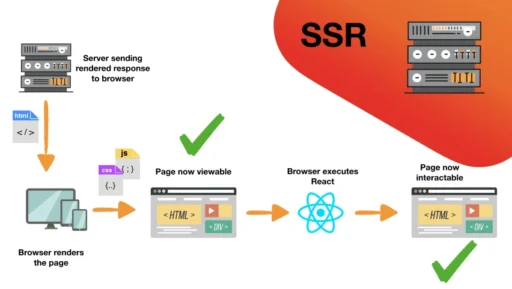
Server-Side Rendering (SSR) is a technique where a web server generates the complete HTML page before sending it to the browser. Instead of loading a blank page and relying on JavaScript to fill the content (as in SPA apps), SSR sends a ready-to-display page immediately.
In simple terms:
➡️ SSR pre-renders HTML on the server, improving load time and SEO.
How SSR Works (Step-by-Step)
1. User Requests a Web Page
The browser sends an HTTP request to the server.
2. Server Fetches Data
The server collects required data from APIs, databases, or services.
3. Server Renders HTML
The backend (Node.js, Django, Laravel, etc.) combines data + templates to generate the final HTML.
4. Browser Displays Fully Rendered Page
The user sees the content instantly without waiting for JavaScript execution.
5. Hydration (For Modern Frameworks)
In frameworks like Next.js or Nuxt.js, JavaScript then “hydrates” the HTML, making it interactive.
Why Use Server-Side Rendering?
✅ 1. Faster First Contentful Paint (FCP)
User sees meaningful content quickly.
✅ 2. Better SEO
Search engines fully understand the rendered HTML.
✅ 3. Works Without JavaScript
SSR pages load even on slow devices or with JS-disabled browsers.
✅ 4. Great for Content-Heavy Websites
Blogs, news websites, landing pages, and e-commerce sites benefit greatly.
When Not to Use SSR
❌ Real-time dashboards
Frequent data changes make SSR less useful.
❌ Highly interactive SPAs
Pure client-side apps (chat apps, games) work better with CSR.
SSR vs CSR (Client-Side Rendering)
| Feature | SSR | CSR |
|---|---|---|
| Initial Load | Fast | Slow (JS loads first) |
| SEO Friendly | Yes | Not ideal |
| Interactivity | Medium, depends on hydration | High |
| Server Load | Higher | Lower |
| Uses HTML Rendering | On server | On browser |
Real Example of Server-Side Rendering (Next.js)
pages/index.js
export async function getServerSideProps() {
  const res = await fetch("https://api.example.com/products");
  const products = await res.json();

  return { props: { products } };
}

export default function Home({ products }) {
  return (
    <div>
      <h1>Latest Products</h1>
      <ul>
        {products.map((p) => (
          <li key={p.id}>{p.name}</li>
        ))}
      </ul>
    </div>
  );
}
What happens?
getServerSideProps()runs on the server- It fetches data and builds the final HTML
- The browser receives a ready-made page with product names visible immediately
Traditional SSR Example (Node.js + Express + EJS)
server.js
app.get("/", async (req, res) => {
  const users = await fetchUsers();
  res.render("home", { users });
});
home.ejs
<h1>User List</h1>
<ul>
  <% users.forEach(user => { %>
    <li><%= user.name %></li>
  <% }) %>
</ul>
This is classic SSR where HTML is rendered on the server before reaching the browser.
Advantages of SSR in SEO-Focused Applications
- Search engine bots easily index content
- Social media previews show correct metadata instantly
- Lower bounce rate because users see content quickly
- Great for blogs, news portals, and product listings
Modern Frameworks Supporting SSR
- Next.js (React)
- Nuxt.js (Vue)
- Angular Universal
- SvelteKit
- Gatsby (server mode)
Should You Use SSR?
Choose SSR if your website needs:
✔ Fast initial loading
✔ Strong SEO
✔ Pre-rendered content
✔ Good performance on mobile devices
Avoid SSR if you need:
✘ Highly dynamic UI
✘ Real-time updates
✘ Lower server costs