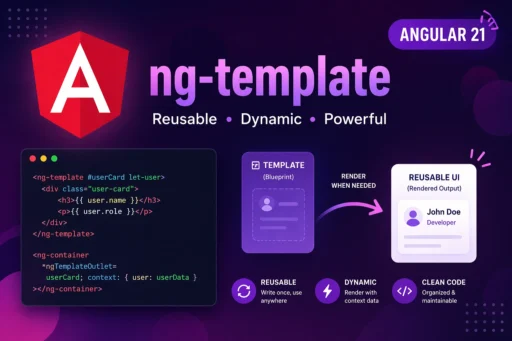
If you’ve been working with Angular for a while, you’ve probably come across ng-template—and maybe even ignored it at first. It doesn’t render anything by default, so it can feel a bit abstract. But once you understand it, ng-template becomes one of the most powerful tools for writing clean, reusable, and dynamic UI logic.
In Angular 21, with improvements in rendering and structural directives, ng-template plays an even more important role in building flexible components.
Let’s break it down in a simple, practical, human way.
What is ng-template?
At its core, ng-template is a way to define a block of HTML that Angular does not render immediately. Instead, Angular stores it and renders it only when explicitly told to do so.
Think of it like a “template blueprint” that sits quietly until you call it.
<ng-template>
  <p>This will not render automatically</p>
</ng-template>
Nothing appears on the screen unless you use it somewhere.
Why ng-template Matters
Without ng-template, you’d end up repeating a lot of HTML or writing messy conditional logic.
It helps you:
- Avoid duplicate UI code
- Create reusable UI blocks
- Work better with structural directives like
*ngIf,*ngFor - Build dynamic layouts
Basic Usage with *ngIf
One of the most common uses of ng-template is with *ngIf and else.
<div *ngIf="isLoggedIn; else loggedOut">
  Welcome back!
</div><ng-template #loggedOut>
  <p>Please log in</p>
</ng-template>
How it works:
- If
isLoggedInis true → show “Welcome back!” - If false → Angular renders the
loggedOuttemplate
This is much cleaner than writing multiple condition blocks.
Using ng-template with ngIf (Advanced)
You can also explicitly use ng-template with ngIf:
<ng-template [ngIf]="isAdmin">
  <p>Admin Panel Access</p>
</ng-template>
This gives you more control when you want to avoid shorthand syntax.
Template Reference Variables
You can assign a reference to your template:
<ng-template #customTemplate>
  <p>This is reusable content</p>
</ng-template>
Then reuse it anywhere using ngTemplateOutlet.
Rendering Templates Dynamically
Here’s where things get interesting.
<ng-container *ngTemplateOutlet="customTemplate"></ng-container>
This renders the template wherever you want.
Passing Data to ng-template
Yes, you can pass context (data) into templates.
<ng-template #userTemplate let-name="name">
  <p>Hello, {{ name }}</p>
</ng-template><ng-container
  *ngTemplateOutlet="userTemplate; context: { name: 'Sagar' }">
</ng-container>
Output:
Hello, Sagar
This is extremely useful for reusable UI components.
Real-World Use Case
Let’s say you’re building a reusable card component.
Instead of hardcoding content, you can pass templates:
<ng-template #header>
  <h2>Profile</h2>
</ng-template><ng-template #body>
  <p>User details go here</p>
</ng-template><app-card
  [headerTemplate]="header"
  [bodyTemplate]="body">
</app-card>
Inside your component:
<div class="card">
  <ng-container *ngTemplateOutlet="headerTemplate"></ng-container>
  <ng-container *ngTemplateOutlet="bodyTemplate"></ng-container>
</div>
Now your component is fully dynamic and reusable.
ng-template vs ng-container
This confuses a lot of developers.
| Feature | ng-template | ng-container |
|---|---|---|
| Renders DOM? | ❌ No | ❌ No |
| Purpose | Store template for later | Group elements without wrapper |
| Use case | Dynamic rendering | Structural directives |
Common Mistakes to Avoid
1. Expecting ng-template to render automatically
It won’t. You must explicitly use it.
2. Overusing it unnecessarily
Use it where reusability or dynamic rendering is needed—not everywhere.
3. Forgetting context binding
When passing data, always use let- syntax correctly.